
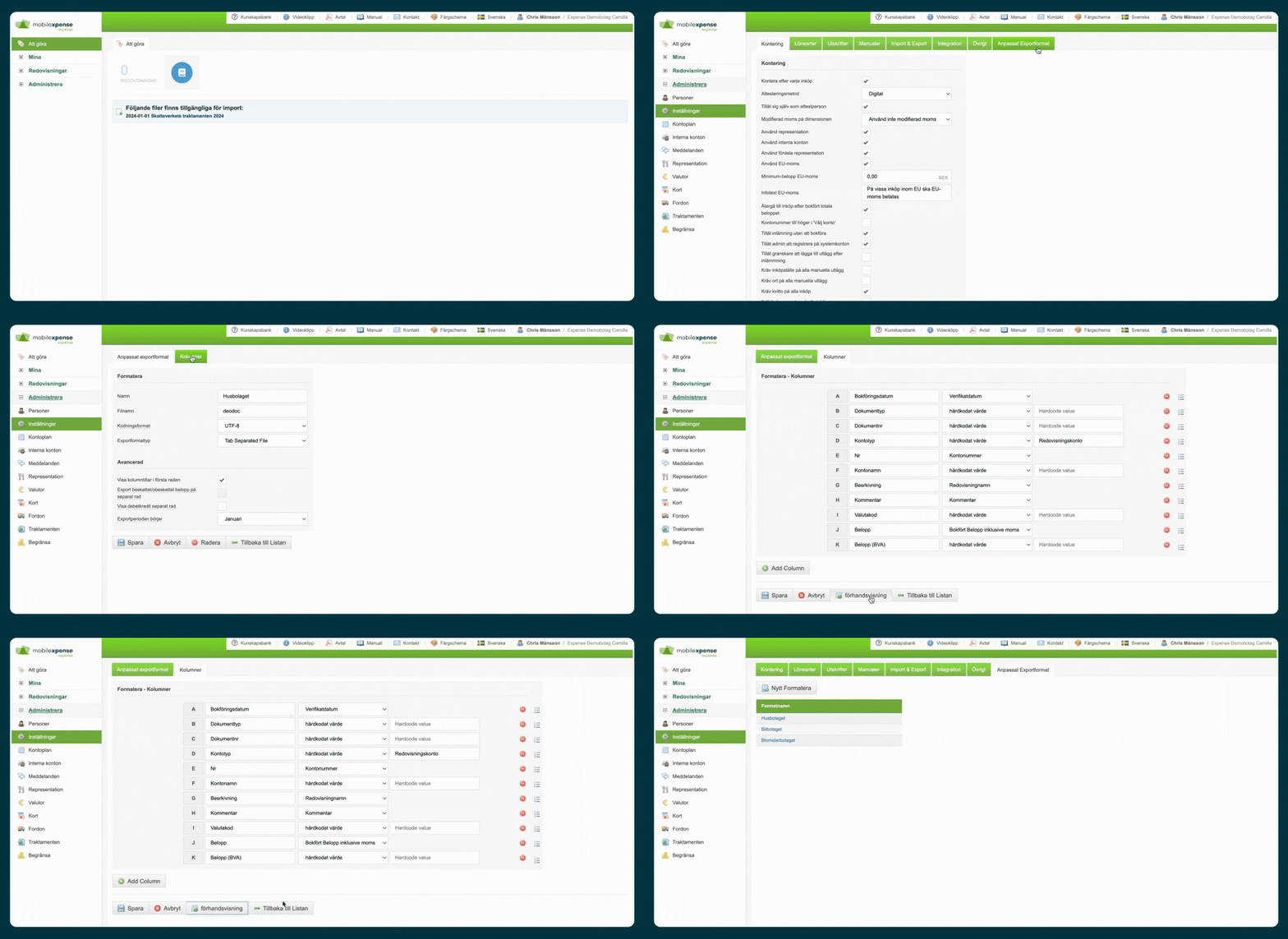
How Do Custom Export Formats Work in Expense?
A custom export format allows you to tailor how data is exported from Expense.
You can:
- 📊 Customize the export structure and content
- 🔗 Integrate with your ERP system
- 🤖 Automate export processes
👉 This provides maximum flexibility for advanced accounting and integration requirements.
When Should You Use a Custom Export Format?
This functionality is particularly useful when:
- 🏢 Your organization uses a complex ERP system
- 📊 Standard export formats do not meet your requirements
- 🔗 Specific field mappings or data structures are needed
👉 Commonly used by larger organizations and businesses with advanced accounting workflows.
What Can You Customize?
You can configure:
- 📄 File formats (e.g., XML, CSV)
- 📊 Fields and exported data content
- 📐 File structure and layout
- 🔄 Export logic and processing rules
👉 Customize the export to match your ERP system's exact requirements.
Benefits of Custom Export Formats
✅ Improved ERP Compatibility
Create export files that align perfectly with your accounting system.
⏱️ Less Manual Work
Reduce the need for manual corrections and adjustments after export.
📊 Accurate Data Transfers
Ensure that information is transferred correctly and consistently.
🚀 More Efficient Workflows
Automate accounting processes and reduce administrative effort.
Automate the Export Process
Expense allows exports to be automated.
Examples
- ⏰ Schedule exports (daily, weekly, monthly, etc.)
- ⚙️ Trigger exports based on specific events
- 🔗 Integrate exports with other business processes
✅ Automation reduces manual work and saves time.
What Happens After the Export Format Is Created?
Once the export format has been configured:
- 📤 Exports are generated according to your settings
- 📊 Data is delivered in the correct structure
- ✅ Files can be imported directly into your ERP system
👉 The entire process becomes more efficient and reliable.
💡 Best Practice Tips
Define ERP Requirements Clearly
- ✅ Understand the required file structure before implementation.
- ✅ Verify field requirements with your ERP supplier.
Test Before Going Live
- 📊 Test the export using sample data.
- ✅ Validate the import process in your ERP system.
Refine and Adjust as Needed
- 🔄 Review export results regularly.
- ✅ Make adjustments if requirements change.
Use Expert Assistance for Complex Scenarios
- 🤝 Seek assistance when advanced integrations or custom logic are required.
👉 These steps help ensure a stable and successful integration.
Frequently Asked Questions (FAQ)
Can I create completely custom export formats?
Yes. Both the file format and exported content can be customized to meet your requirements.
Can exports be automated?
Yes. Exports can be scheduled and triggered using configured rules.
Do I need technical knowledge?
It depends on the complexity of the export requirements. For advanced scenarios, Expense Support can assist with the setup.
Summary
- 📊 Create custom export formats in Expense
- 🔗 Adapt exports to your ERP or accounting system
- 🤖 Automate export workflows
- 📄 Customize file formats, fields, and structure
- ✅ Reduce manual work and improve data quality
- 🚀 Streamline accounting processes and system integrations